| Construction Rating: | starstarstarstar_borderstar_border |
| Flight Rating: | starstarstarstar_borderstar_border |
| Overall Rating: | starstarstarstar_borderstar_border |
| Manufacturer: | Estes  |
Brief:
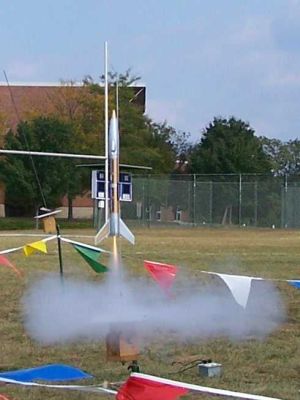
Estes Astrovision is a RTF digital video / camera rocket that downloads to a Windows based computer. Sold with a standard Estes launch pad and launcher. Video mode is 320x240 and camera mode is 640x480.
Construction:
1 RTF Digital Rocket Camera. Also comes with standard Estes launch pad and launcher.
You need a small Phillips head screwdriver to open the battery compartment to add three small button cells. Rocket comes with 6 cells.
Finishing:
No finishing required. RTF rocket comes with preprinted body tube.
Construction Rating: 3 out of 5
Flight:
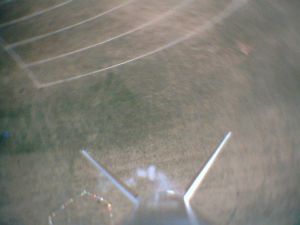
Launched three times, 2 times in video mode and once in camera mode. All three flights were on a C6-5. The two video flights the rocket spun making a dizzy view of the ground. On the camera flight, it took 4 photos. 1 still sitting on the pad, 1 from altitude, 1 of the parachute coming out, and 1 of just blue sky.
To fly, you turn on the camera. Once you push the start button on the camera, a LED flashes for 15 seconds then goes out. The LED is bright enough to be seen from a safe distant from the pad. The camera starts running 3 seconds after the LED stops flashing. Start you count down from 5 when the LED stops flashing.
Recovery:
This rocket used a rubber band shock cord that was attached to the launch lug mount. It held up to the three flights with no wear. It could have been a tad bit longer.
I didn't use the parachute that came with the rocket. It comes with a low quality China made chute that has the cheap parachute lines that break way to easy. I used a nylon chute that comes with the Estes Oracle. That chute also comes with the Liquidator.
Chute size is just about right to land without damage and too much drift.
Flight Rating: 3 out of 5
Summary:
Easy and fairly inexpensive (goes for about $50 on discount) way of getting aerial digital photos and videos. Doesn't require large motors, so you get more launch opportunities on smaller fields.
Overall Rating: 3 out of 5
Other Reviews
- Estes AstroVision By Joy Sills (December 16, 2007)
Brief: The Estes Astrovision is a RTF rocket that comes in a Rocket Launch set with a launch stand and controller. The unique thing about the Astrovision is that it lofts a digital camera into the air. The camera can take both digital video (12 seconds worth) and digital still pictures. Construction: The parts list: Camera Nosecone Plastic Fin Can Pre-preprinted ...
 |
 |
Flights
|
|

B.P. (March 6, 2008)
Sponsored Ads




|
|
A.H. (January 10, 2008)